

MW4 DMZ Ghost Shipment: HVT, SAM site and cargo walkthrough
Keep following the tracker after the helicopter goes down.
Eliminate the marked HVT, take the Classified Orders and capture the assigned SAM site. Wait for the helicopter to be shot down, then follow any cargo-container objective before leaving. Locations and reported endings vary.
- Dynamic Op, not a selectable Story Mission
- Collect the intel after the HVT kill
- Cargo recovery can follow the helicopter step
The helicopter crash may leave one task: recover the cargo. Ghost Shipment moves from an HVT hunt to a SAM capture, then follows the ending shown by your tracker. Do not leave the area just because the aircraft is down.
Confirm Ghost Shipment is active
Check the operation name before following this walkthrough. A documented run starts in a red-lit bunker northeast of the prison; other reports use different locations. The original gameplay supplies an example route, not a permanent activation point.
Use your match’s marker to reach the starting device. The Dynamic Ops guide explains field activation if you are completing an Order that asks you to collect a phone.
HVT, Classified Orders and SAM capture
| Stage | Check before moving on |
|---|---|
| Reach the HVT | Confirm the marked target belongs to Ghost Shipment |
| Eliminate the target | Collect the Classified Orders after the kill |
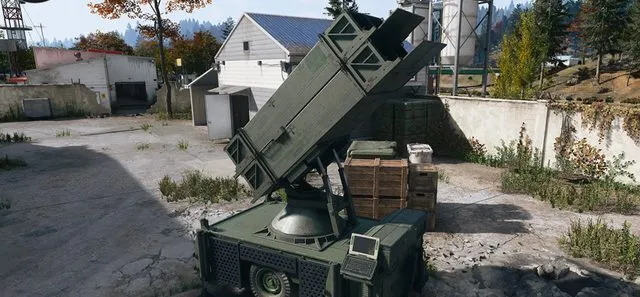
| Approach the SAM | Use the assigned launcher and begin its capture |
| Defend the capture | Wait for the tracker to advance |
| Helicopter | Let the captured site complete the aircraft objective |
| Cargo | Open the marked Lieutenant’s Cargo Container if required |
The reported prison/Citadel route uses a rooftop SAM. Check access and cover before starting a defense: rushing to the terminal with no ammunition reserve leaves little room to recover.
The HVT kill and intel pickup are separate actions. If no new waypoint appears, look for the mission item before travelling to a SAM site you remember from another run.
Wait for capture, then check the ending
Stay focused on the capture objective rather than chasing unrelated targets. Read the current objective before leaving the launcher. Use the UAV and SAM guide for the general capture controls.
After the aircraft is destroyed, inspect the operation panel. If it asks for cargo, follow the new waypoint and open that container. A random supply crate nearby is not a substitute. If the completion banner has already appeared, plan your next move using that result rather than expecting every report to have the same final steps.
Recover loot and leave time to exfil
Finishing an operation and extracting carried loot are different checks. Open the cargo, take what you want and compare the remaining time with your route to an active extraction site. See the exfil guide before committing to another long chain.
Use reference terrain to plan travel; your live Tac-Map supplies the operation’s actual targets and active exfils.
Quick questions
Why is Ghost Shipment still active after the helicopter crashes?
Check for Loot the Lieutenant’s Cargo Container. In the documented cargo route, opening that marked container completes the operation.
Do I always start Ghost Shipment at the prison bunker?
No fixed start is established. The prison-bunker route is one reported example; follow the available operation marker and activation prompt in your match.
Mentioned in this guide
Spotted something wrong? Send a correction.
Keep reading
Guide · MissionsMW4 DMZ Dynamic Ops and Side Ops: objectives and walkthroughs  Guide · Getting startedMW4 DMZ exfil guide: helicopters, flares and Fulton
  Guide · Combat & survivalMW4 DMZ UAV Towers and SAM sites: activation and defence
  Guide · MissionsMW4 DMZ Compounds: clearing, safes and Medical Extraction Intel