
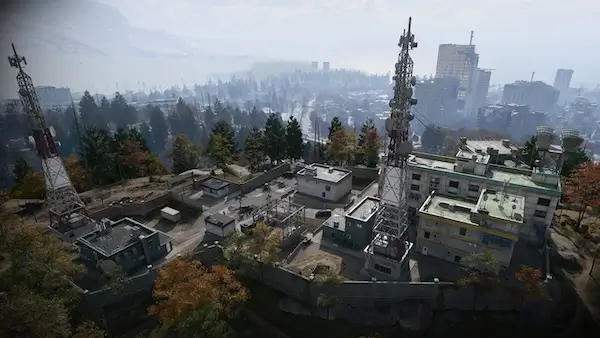
Cheonwang Peak Array loot route: three safes and electronics
Check the rear-entry building, the taller server building and the central L-shaped building before deciding whether to extract.
At Cheonwang Peak Array, a recorded run visits a safe in the rear-entry building, another on the server building's fourth floor, and a third upstairs in the central L-shaped building. Search server blades and computers along the way. The run produced a PPSh-41 Weapon Manual, Shopping DRC Locker key and Power Regulator; these are possible finds, not guaranteed rewards.
- Three demonstrated safe rooms in one POI
- Search individual server blades and computers
- Iskra's locked Control Room is an optional detour
- Loot value is different from banked cash
Use Cheonwang Peak Array for a focused safe-and-electronics search. The useful loop is three buildings: the rear-entry building, the taller server building, then the central L-shaped building. Search the safes for unlocks and valuables, and the electronics containers for ingredients you actually need.
This route follows one recorded deployment. It does not establish drop rates, guaranteed unopened safes or a fixed cash return. The area is Medium threat, and the run includes armed defenders; bring armor, healing and ammunition.
Find the Array and choose your priority
Open the Hajin map and select Cheonwang Peak Array in central Hajin. Use the telecom mast, taller server building and surrounding small buildings to orient yourself. The Hajin guide covers nearby regions.
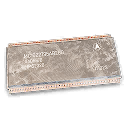
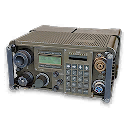
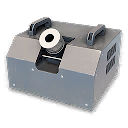
For a Manual or key, check all three safe rooms. For a CPU, Comms Module or Power Regulator shortage, give the server building more attention. Reserve backpack space for your target.
| Stop | Where to search | Useful landmark |
|---|---|---|
| First building | Safe in the room reached from the rear/side entrance | Low grey-sided building with a green door and rooftop sandbags |
| Server building | Fourth-floor safe, then electronics rooms | Taller building beside the lattice telecom mast; blue-and-white interior stairs |
| Central L-shaped building | Upstairs safe and nearby lockers | Small L-shaped footprint near the middle of the compound |
These are building descriptions, not surveyed door coordinates. If a room has already been searched, decide whether the remaining containers justify staying.
First stop: the rear-entry safe
Approach the low grey building from its rear or side. The demonstrated entrance leads to a small office containing a safe beside a desk and filing cabinets. Check it before spending time on the rest of the building.
The run also checks upstairs, computers, a jacket and bags around the lower/front rooms. Treat those as optional searches once the safe is done. A gun found in a container is an opportunity, not a guaranteed weapon spawn or the same reward as its Manual.
Open an ordinary safe using its interact prompt. The safe-opening guide explains the interaction and Robbery’s separate extraction check.
Second stop: the server building
Cross to the taller building beside the mast and use the interior stairs. The demonstrated safe is on the floor described as the fourth floor, among server equipment. Check the safe, then search back through the electronics rooms.
The recorded safe produces a Shopping DRC Locker key. That key opens a different destination beneath NuriGO Mall. Finding it here does not mean its locker is at the Array; check the key page for the separate access requirements and remaining uncertainties.
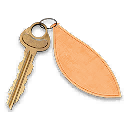
To use that key afterward, follow the Shopping DRC Locker lab route. It shows the named unlock during Shopping Hacks and separates the extra room’s reported core requirement from the mission’s earlier gate.
Search individual server blades
Look along each server rack for an interaction icon. Move your aim up and down: the loot prompt may belong to an individual blade rather than the whole cabinet. Check computers as well.
The run includes CPUs, a Comms Module and a Power Regulator visibly looted from a Server Blade. Control Units are also reported during the search. These are container leads; they do not make every rack lootable or guarantee a rare ingredient each visit.
Skip the locked Control Room unless you brought its key
An upper room displays Iskra’s Control Room — Locked. The recorded route leaves that door closed and continues elsewhere. You can follow the three safe stops without opening it; bring the matching key if you intend that additional room.
The door label does not establish an Iskra spawn or guaranteed key drop.
Third stop: the central L-shaped building
Return to the smaller L-shaped building near the center. Go upstairs and check the lockers, then the safe beside the shelving and window. Ground-floor containers are optional if time and supplies allow.
The demonstrated reward is Manual: PPSh-41. Its card describes a Gunsmith purchase unlock. It is a Weapon Manual, rather than a cosmetic Weapon Blueprint or a finished replacement gun.
Read the exact weapon name before carrying a duplicate you do not need. After returning, inspect the relevant Gunsmith unlock rather than assuming a loose PPSh-41 gave the same purchase access.
Protect useful finds and extract
Put an eligible valuable find in an available Secure Slot, and verify its position after rearranging your backpack. The Secure Slots guide explains the protection and its limits. Securing one Manual does not protect all your cash, ordinary backpack contents or extraction objectives.
Keep the healing, plates and ammunition needed to get out. Remove low-priority loot first when making room for ingredients.
The recorded extraction shows 47,700 backpack/loadout value and 8,250 banked cash, including the 5,000 Manual reward. Those are different totals. Neither is a promised payout, and carried equipment contributes to the value figure.
Optional extension: Alpha, then Bravo
The run continues to Compound Alpha and Compound Bravo. At Alpha, another player is present and the safe has already been searched. Bravo is also looted. Check the situation before extending your run; the extra compounds are not guaranteed rewards.
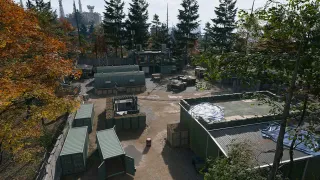
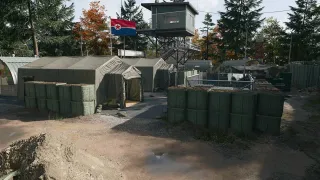
Use the Compound map layer if you need another stop. Once you have your target, compare that detour with your supplies and available extraction. The material locations guide offers other search areas and printing alternatives when the Array does not supply your shortage.
Quick questions
Are the three safes guaranteed to be available?
Three safe locations are demonstrated in one run. That does not establish an every-match guarantee, and other players may reach them first.
Do I need Iskra's Control Room key for this route?
The recorded three-safe route skips that locked side room. Its separate key is needed if you choose to enter the Control Room.
Does this route guarantee a Weapon Blueprint?
No. The demonstrated weapon unlock is Manual: PPSh-41, which unlocks the Gunsmith purchase. A Weapon Manual and a Blueprint build are different rewards.
Mentioned in this guide
Spotted something wrong? Send a correction.
Keep reading
 Guide · Gear & craftingWhere to find crafting materials in MW4 DMZ
  Guide · Gear & craftingMW4 DMZ Secure Slots: what survives death and disconnects?
  Guide · Gear & craftingShopping DRC Locker: key, extra cores and lab route
  Guide · Gear & craftingMW4 DMZ Weapon Manuals: where to look and how unlocks work