

MW4 DMZ Dead Man's Cache: intel, bomb and HVT walkthrough
Destroying the cache can reveal another objective: eliminate the marked HVT.
Recover the assigned intel, download the cache location, collect the marked bomb and destroy the ammo/armor cache. Continue to the HVT objective when it appears. The recorded route completes after the target is eliminated.
- The intel opening can vary
- Cache destruction is an intermediate step
- Check for the final HVT before leaving
Check for the HVT after the cache is destroyed. Dead Man’s Cache is a chain of intel and demolition objectives. Reaching or destroying the cache does not establish that the whole operation has ended.

Recover intel and download the location
The archived recorded gameplay begins with encrypted-drive work and continues to Download Location of Cache. Complete the assigned intel interaction and follow the next terminal marker.
Other reports use a hidden-cache or enemy-comms opening. Read the active objective before searching for a device from another run. If your tracker gives a keypad stage, use the digits from that deployment; the code guide explains the difference between an objective password and a named key.
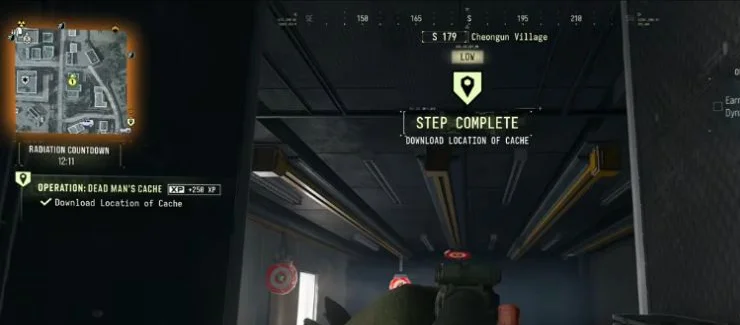
Collect the bomb and destroy the cache
| Stage | Check before moving on |
|---|---|
| Download | Finish the terminal interaction and wait for the next waypoint |
| Bomb pickup | Open the marked container and actually take the bomb |
| Cache destruction | Complete the demolition interaction at the operation’s assigned cache |
| HVT | Follow and eliminate the target named by the new objective |
A vehicle trunk supplies the bomb in the archived run. Treat that as an example container. The important distinction is between finding the container, taking the mission item and using it at the target.
Before starting demolition, choose cover and check your route away from the explosives. Avoid abandoning the objective to loot an unrelated safe while the operation is still active.
Complete the HVT stage and check your reward
After the destruction update, inspect the operation panel. If it says to kill the HVT, follow that marker and finish the target before travelling to an exfil. Wait for Operation Complete, then inspect the supplied reward container.
If you are also doing Operation Rewards or Payment Due, check those counters separately. Operation completion, crate looting and the Order’s earnings requirement are different checks.
Use your match’s targets and active exfil sites; the reference map does not supply a permanent cache or HVT spawn.
Quick questions
Why did destroying the cache not finish the operation?
The recorded route continues to Kill the HVT in the Area. Follow the new target and wait for Operation Complete.
Is the bomb always in the same vehicle trunk?
A trunk is used in the recorded route. Follow your assigned container and current tracker if your deployment uses a different opening or pickup.
Mentioned in this guide
Spotted something wrong? Send a correction.
Keep reading
Guide · MissionsMW4 DMZ Dynamic Ops and Side Ops: objectives and walkthroughs  Guide · MissionsMW4 DMZ keypad codes: find your mission's code and the right lock
  Guide · Getting startedMW4 DMZ exfil guide: helicopters, flares and Fulton
  Guide · MissionsMW4 DMZ Compounds: clearing, safes and Medical Extraction Intel