
DMZ silo loot route: entrances, inner doors and lockers
Six reported search areas in western Hajin · Ordinary loot room and Control Room differ · No guaranteed Manuals or rare loot
Look for the circular silo structures in western Hajin, find the nearby bunker entrance and follow the ordinary loot-room route before considering a locked Control Room. This is a reported search route with actual entrance and locker images; it does not promise a Manual, rare weapon or quiet visit.
- Six reported search areas in western Hajin
- Ordinary loot room and Control Room differ
- No guaranteed Manuals or rare loot
Western silos · Choose a nearby search
Before you deployBring plates, healing, ammo and backpack space. Choose an active exit before committing.
Open planYour objective checklist
Pick the nearest search area
Pick one of the six reported western areas near your deployment. The plan does not connect them into a six-stop tour.
Finished when: You have chosen whether to continue, change area or leave with your current finds.
Find the concrete entrance
Look for circular silo structures and a recessed concrete entrance with grey double doors. These area pins do not identify exact doors.
Finished when: You are inside the intended building and have matched the described landmarks.
Follow the ordinary room route
For the reported ordinary room, continue along the corridor and take the left route behind the internally secured door. Match your layout.
Finished when: You have checked the described containers and decided whether to continue. Loot can be absent.
Keep the Control Room optional
Keep the locked Control Room separate from the ordinary loot room. Read the actual lock prompt and leave with useful finds; rewards vary.
Finished when: You have chosen whether to continue, change area or leave with your current finds.
Area references, not surveyed interior doors. Loot and active exits vary; lines show visit order, not checked paths.
Look for the circular silo structures in western Hajin, find the nearby bunker entrance and follow the ordinary loot-room route before considering a locked Control Room. This is a reported search route with actual entrance and locker images; it does not promise a Manual, rare weapon or quiet visit.
Pick the nearest search area
Six broad silo areas are reported: north and northeast of the Political Prison, west of Tong-il Village, west and south of Chang-san Air Base, and southwest of Deadtown. Zoom into the western Tac Map and compare circular structures with the surrounding roads.
These are orientation areas, not newly surveyed entrance pins. Choose one near your deployment rather than crossing Hajin to check all six. Take plates, healing, a weapon and Backpack space; an apparently remote bunker is not proof that no enemies or players are present.
Find the concrete entrance
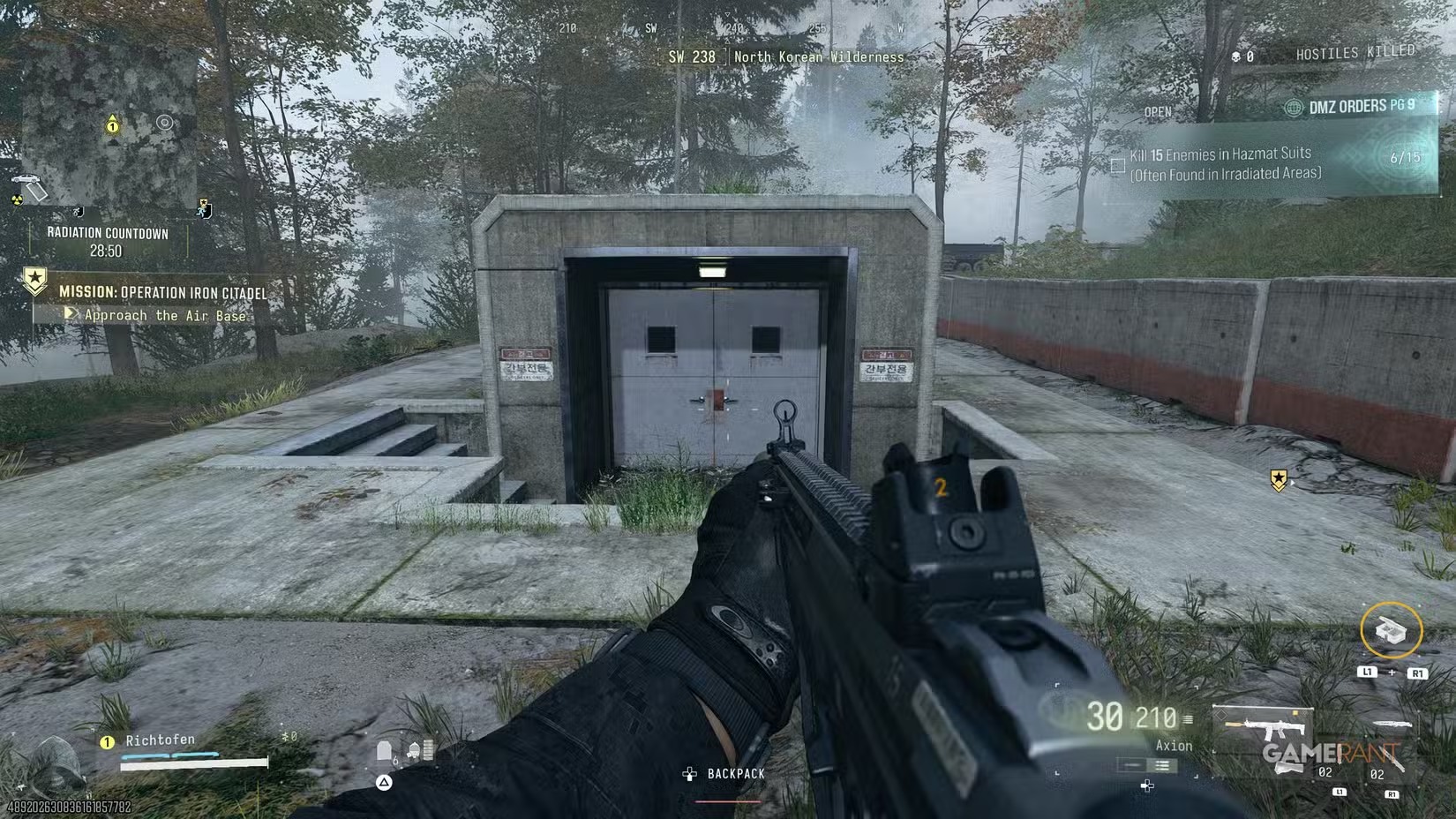
Walk around the circular surface structure and look for the nearby concrete stairwell entrance. The reference shows grey double doors in a recessed concrete surround. Inspect your own door prompt before committing resources.
The reported ordinary entrance does not need the Control Room’s access item. If you encounter a different named lock, stop and read it rather than spending a rare breacher on the assumption that every bunker door is the same.
Follow the ordinary room route
The route report encounters a door secured from the inside. Continue along the corridor and take the left-hand route to the back of the same room, instead of treating that door as a reason to leave or use a charge.
Check rooms and corners as you move. This describes the reported bunker layout; match the corridor in your run rather than forcing the instruction onto an unrelated underground complex.
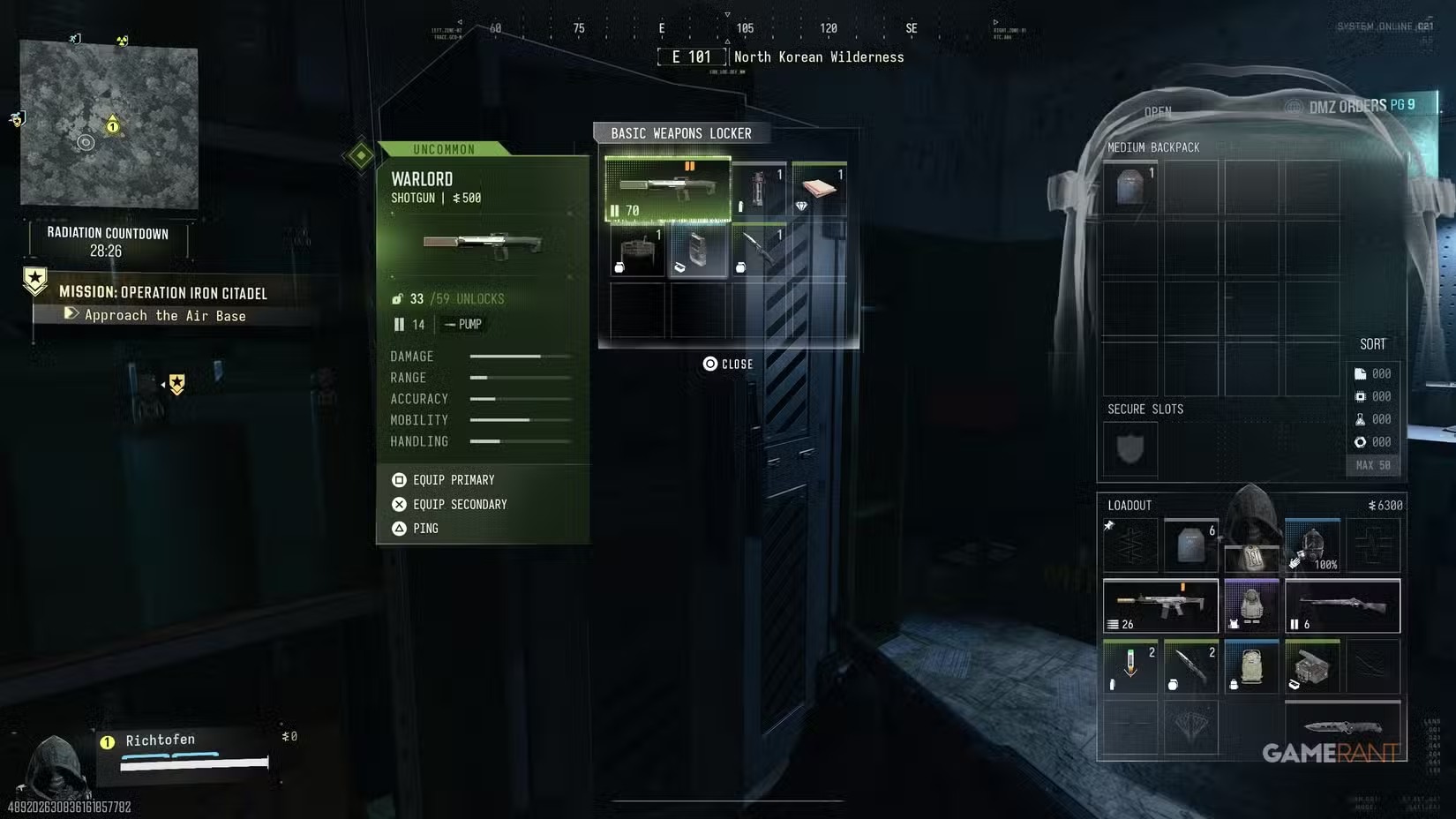
Inspect the Basic Weapons Locker and other containers. The pictured opening includes an Uncommon Warlord, not a guaranteed Legendary weapon. A gun, a Recipe and a Weapon Manual are different pickups; read the actual card before deciding what to carry.
Keep the Control Room optional
The Silo Control Room is a separate locked destination. A Door Breacher Charge opening is reported, but this guide does not establish that it is the only possible access method. Do not spend an Ultra item simply because you found an inside-secured ordinary door.
No usable missile action is demonstrated by the available report. Treat the room as an optional access decision, not a promised launch objective, secret reward or guaranteed profitable stop. Check the breacher guide before consuming one.
Leave with the useful loot
Review your keep, sell and craft priorities after the first room. If it solves your equipment shortage, plan extraction rather than automatically chaining every silo. If it is empty or already searched, choose a nearby fallback; repeating the same containers will not guarantee a different roll.
Quick questions
Do I need a breacher for the ordinary loot room?
The illustrated route report follows the corridor left around an inside-secured door to the ordinary room. The separately named Silo Control Room has different access.
Are these guaranteed safe Manual farms?
No. Loot varies, other Operators can arrive and a quiet recorded visit does not establish safety or a guaranteed Manual.
Spotted something wrong? Send a correction.
Keep reading
 Guide · Gear & craftingMW4 DMZ loot guide: what to keep, sell and use for crafting
 Guide · Gear & craftingMW4 DMZ Door Breacher Charge: how to get and use it
 Guide · Combat & survivalDMZ exfil guide: extraction methods and emergency plans
 Guide · Gear & craftingMW4 DMZ 3D Printer guide: resources, ingredients and recipes