
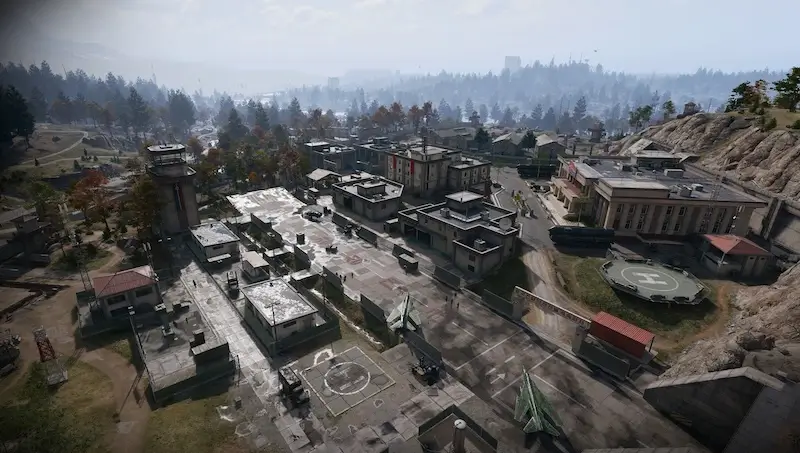
Weapons Mod Workshop: air-base key and upstairs route
Locate Chang-san Air Base and its clinic before entering the military buildings.
Use the Weapons Mod Workshop key upstairs in the military repair garage directly west of Chang-san Air Base's clinic. B5 is the key's search area; match the named workshop lock after climbing the interior stairs.
Find your key or locked room
Browse every key in the Key FinderUse the Weapons Mod Workshop key upstairs in the military repair garage directly west of Chang-san Air Base’s clinic. B5 is the key’s search area; match the named workshop lock after climbing the interior stairs.
Open the map search area · Check the matching key
Find the named entrance
- Locate Chang-san Air Base and its clinic before entering the military buildings.
- Find the military repair garage immediately west of the clinic; the walkthrough approaches a large building within the base walls.
- Go inside and take the interior stairwell to the upper floor. The key card calls this the second floor; use the named lock rather than a floor-number guess.
- Clear the approach and read Weapons Mod Workshop on the door before using the matching key.
Workshop, Field Depot and bunker are different stops
Field Depot is northeast of the clinic in a supply warehouse, whereas this workshop is west of it and upstairs. Supreme Leader’s Bunker uses separate access. Do not carry one key and plan to open all three.
What the room search establishes
The reviewed short walkthrough establishes the approach, but not a complete room loot table or repeatable key pickup. Choose this detour when you already hold the key; do not buy a loadout around an advertised guaranteed Manual.
Mentioned in this guide
Spotted something wrong? Send a correction.
Keep reading
 Guide · Combat & survivalDMZ exfil guide: extraction methods and emergency plans Guide · Bosses & PvPField Depot: air-base warehouse and maintenance-room entrance
 Guide · Bosses & PvPMW4 DMZ bosses: Lieutenants, Commanders and the Boss Board
 Guide · Bosses & PvPMW4 DMZ Deathstalker guide: SAM Sites, wreck loot and RF Modules