
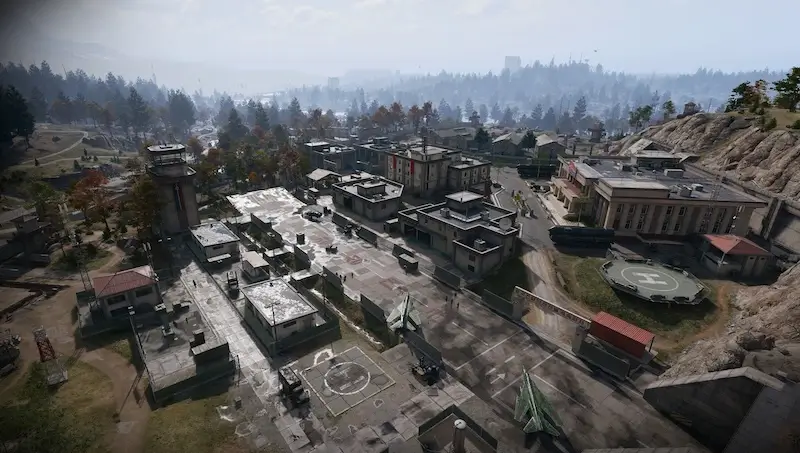
Field Depot: air-base warehouse and maintenance-room entrance
Identify the air-base clinic, then search northeast for the military supply warehouse in the B5 area.
Field Depot is the locked gear-maintenance room on the first floor of the military supply warehouse northeast of Chang-san Air Base's clinic. The reported approach uses the warehouse with North Korean flags and a door behind an Ammo Armor Cache.
Find your key or locked room
Browse every key in the Key FinderField Depot is the locked gear-maintenance room on the first floor of the military supply warehouse northeast of Chang-san Air Base’s clinic. The reported approach uses the warehouse with North Korean flags and a door behind an Ammo Armor Cache.
Find the named entrance
- Identify the air-base clinic, then search northeast for the military supply warehouse in the B5 area.
- Look for the warehouse with North Korean flags. Published directions place it on the right while entering the base, so confirm the clinic relationship if you approach another way.
- Find the Ammo Armor Cache and check the door to its left/behind it in that approach.
- Match Field Depot on the maintenance-room lock and use the matching carried key.

Do not substitute the workshop or bunker key
Weapons Mod Workshop is upstairs west of the clinic; Field Depot is the first-floor warehouse room northeast of it. The bunker below Admin Complex No. 2 uses separate access. Choose the correct building before committing to the air base’s guarded interior.
What the room search establishes
The reviewed written route identifies the room, but does not establish a full loot table or a guaranteed key pickup. The key is described as random field loot. Treat this as a planned room visit when you already hold access, rather than a guaranteed low-cost farming route.
Mentioned in this guide
Spotted something wrong? Send a correction.
Keep reading
 Guide · Combat & survivalDMZ exfil guide: extraction methods and emergency plans
 Guide · Bosses & PvPMW4 DMZ bosses: Lieutenants, Commanders and the Boss Board
 Guide · Bosses & PvPMW4 DMZ Deathstalker guide: SAM Sites, wreck loot and RF Modules
 Guide · Bosses & PvPGas Station Electrical Room: Construction Zone basement route