
Mechanic's Shack key: find the hut south of the clinic
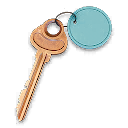
Locate the clinic in Cheongun Village and inspect the small buildings directly south of it.
Use the Mechanic's Shack key at the small standalone hut immediately south of Cheongun Village's clinic. Its card lists F5; use the clinic, hut and named lock when the map's grid placement differs.
Find your key or locked room
Browse every key in the Key FinderUse the Mechanic’s Shack key at the small standalone hut immediately south of Cheongun Village’s clinic. Its card lists F5; use the clinic, hut and named lock when the map’s grid placement differs.
Open the map search area · Check the matching key
Find the named entrance
- Locate the clinic in Cheongun Village and inspect the small buildings directly south of it.
- Find the standalone back hut shown in the route. It is a compact outbuilding, not a large garage or hospital room.
- Approach the door and confirm Mechanic’s Shack. The walkthrough notes that the barred window does not provide entry.
- Use the matching key and check the single room’s containers before extending the deployment.
Use the clinic landmark when the grid disagrees
The item card and community map calibration do not always place this hut in the same apparent square. Do not move the search to a different village merely to force the F5 label to match. The clinic and named door identify the intended destination.
What the room search establishes
The recorded opening searches weapon, armor and tool containers, lockers and bags; a Medium Backpack and armor are examples from that run. These are variable finds, not a fixed regain kit. Keep your needed mission and upgrade ingredients when ordinary equipment would be a downgrade.
Mentioned in this guide
Spotted something wrong? Send a correction.
Keep reading
 Guide · Combat & survivalDMZ exfil guide: extraction methods and emergency plans
 Guide · Bosses & PvPField Depot: air-base warehouse and maintenance-room entrance
 Guide · Bosses & PvPMW4 DMZ bosses: Lieutenants, Commanders and the Boss Board
 Guide · Bosses & PvPMW4 DMZ Deathstalker guide: SAM Sites, wreck loot and RF Modules